What's Multi Hop VPN?
A Standard VPN(one hop) routes your traffic through a single server.

Standard VPN connection
While a Multi-hop VPN routes it through multiple servers for enhanced security and privacy.

Multi Hop VPN connection
Multi-hop VPN for faster speed and lower latency
A Multi-hop VPN can improve speed and reduce latency by optimizing packet routing between servers. For example, accessing a site in Japan from Canada via a USA-Hong Kong Multi-hop route can be faster due to our premium, optimized links.
How to Configure Multi-Hop VPN
Step 1: Select First Server
• Tap "Select Servers" on the main screen
• Choose your first server (e.g., Singapore)
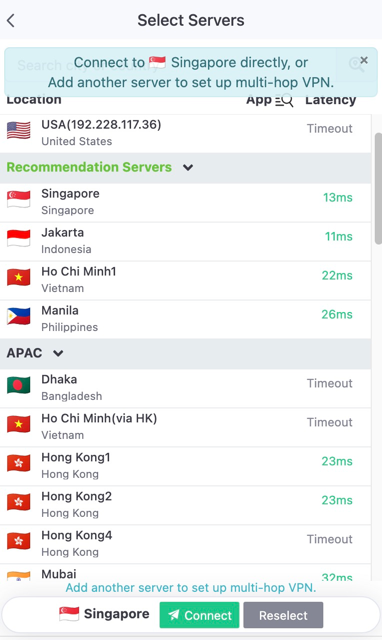
Select your first server and tap "Add another server"
Step 2: Add Second Server
• Tap "Add another server to set up multi-hop VPN"
• Select your destination server (e.g., Istanbul)
• Review the latency comparison
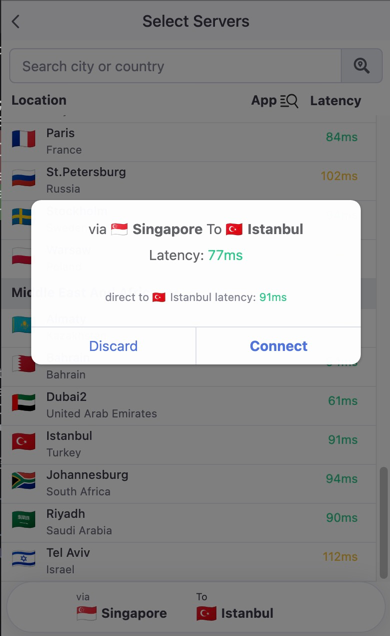
Confirm multi-hop route and latency
Step 3: Connect
• Tap "Connect" to establish the multi-hop connection
• Your traffic will now route: You → First Server → Second Server → Destination
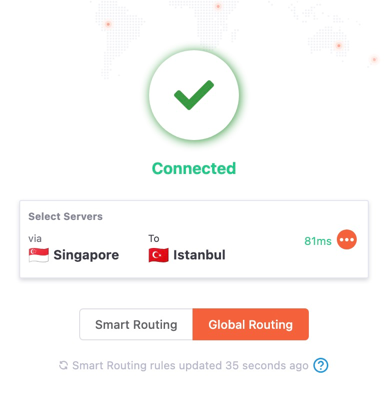
Successfully connected via multi-hop VPN
💡 Tip: The app shows both multi-hop latency and direct latency for comparison. Choose the route with lower latency for better performance.