
Zimbabwe IP, Proxy & VPN
Zimbabwe's mobile-first, largely cashless economy runs on mobile money and local broadcasters that commonly restrict payment tools and streaming to local visitors, so Surflare pairs a Zimbabwe VPN with Datacenter, ISP and Residential IPs to get you in, whether you're streaming, paying or running scrapers.
 Zimbabwe VPN
Shared IP - Encrypt your connection and browse privately at full speed across 80+ countries
 Zimbabwe Datacenter IP
Static · Dedicated - Fast, stable, and affordable. Hosted in datacenters and registered to hosting providers.
 Zimbabwe ISP IP
Static · Dedicated - Residential trust with datacenter stability. One fixed IP, exclusively yours.
Not sure which IP type fits your use case? Compare Datacenter, ISP and Residential IPs
About Zimbabwe
Zimbabwe is a landlocked southern African country of around 17 million people, home to Victoria Falls and a large diaspora abroad that keeps close ties to family and services back home.
With a mobile-first, largely cashless economy built on mobile money, Zimbabwean broadcasters, retailers and payment platforms commonly restrict access, pricing and payment tools to visitors with a Zimbabwean IP address.
Zimbabwe Internet Providers
Econet Wireless, NetOne, TelOne and Liquid Home (ZOL) cover Zimbabwe end to end, and your IP is drawn straight from their residential ranges.
- Econet Wireless — The dominant mobile operator, with roughly three-quarters of the market and its own EcoCash mobile money arm.
- NetOne — The state-owned second-largest mobile network.
- TelOne — The state-owned fixed-line incumbent and main ADSL/fibre provider.
- Liquid Home (ZOL) — A long-running fibre and WiFi ISP built on the Liquid Telecom network.

Why a Surflare Zimbabwe IP
Most providers only offer one type of Zimbabwe IP. Here's what sets Surflare apart.
- From Econet's network to Residential IPs — Switch between Zimbabwe VPN, Datacenter, ISP and Residential IP types drawn from carriers like Econet Wireless, NetOne and TelOne, all from one account.
- One tap into Z+ and ZTN Prime — Connect with a single tap in the Surflare app, or drop Zimbabwe SOCKS5/HTTP proxy credentials straight into the scraper or anti-detect browser you already use for mobile money research.
- A Zimbabwe IP that's yours alone — Datacenter and ISP IPs are dedicated to your account only, so an OK Zimbabwe or EcoCash profile never shares its address with another user.
- Target Harare, Bulawayo or beyond — A large pool of Zimbabwe IPs lets you narrow down to Harare, Bulawayo or another specific city instead of a random nationwide address.

Zimbabwe services you can reach

What you can do with a Zimbabwe IP

Multi-account operations
Give each OK Zimbabwe, social or marketplace account a stable Zimbabwean IP in an anti-detect browser to keep profiles separated.

Zimbabwean streaming in the app
Connect through the IP in the Surflare app for Z+ and ZTN Prime, which are limited to viewers in Zimbabwe.

Zimbabwean market research
View Zimbabwean pricing, search results and ads exactly as a real local visitor would.

Web scraping and data collection
Route crawlers through a Zimbabwean residential proxy so requests read as ordinary local visitors and avoid blocks.
Ad verification and campaign QA
Check how your Google, Meta or programmatic ads actually render for a Zimbabwean audience, and confirm competitor campaigns and landing pages are live and geo-targeted correctly.
Zimbabwe IP, ready on every device
Whichever Zimbabwe IP you get, Datacenter, ISP or Residential, just click to connect in the Surflare app. No manual proxy setup, no complex configuration.
Surflare apps are available for iOS, Android, Mac, Windows and Linux, plus browser extensions and router support.
With the Surflare app, your traffic stays encrypted on every device.

Use Zimbabwe Residential IP via VPN or Proxy
Connect to a Zimbabwe VPN, Datacenter IP or Residential IP with one click in the app, or use Zimbabwe proxy credentials directly in your own tools and scripts.
Surflare App
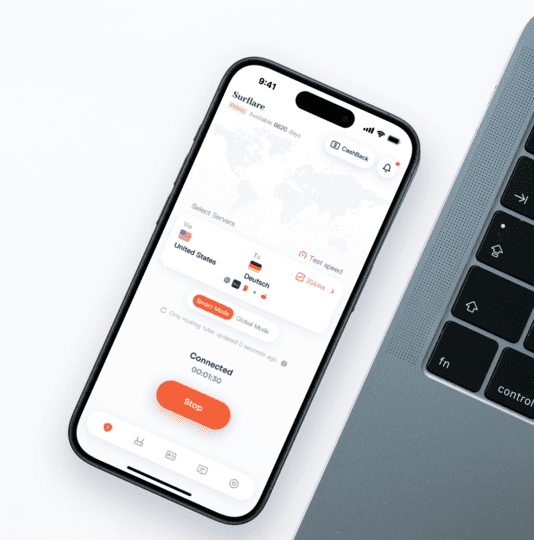
- One-tap connection to a Zimbabwe VPN, Datacenter IP or Residential IP, no extra setup
- A consistent IP for streaming, banking and everyday browsing
- Switch locations any time, at no extra cost
SOCKS5 / HTTP Proxy
# SOCKS5 proxy
curl --proxy socks5://user:pass@proxy.surflare.com:1080 \
https://api.ipify.org
# HTTP proxy
curl --proxy http://user:pass@proxy.surflare.com:8080 \
https://api.ipify.org
# Python example
proxies = {"http": "socks5://user:pass@proxy.surflare.com:1080"}
- Zimbabwe Datacenter and Residential IP Proxy
- SOCKS5 and HTTP(S) support
- Built for scrapers, automation and account management
Frequently asked questions
Can I watch Z+ or ZTN Prime with a Zimbabwe IP?
A Zimbabwean IP lets you reach domestic-only services like Z+ and ZTN Prime that are restricted to visitors inside Zimbabwe, and a residential IP is the most reliable option.
Does Surflare offer a dedicated Zimbabwe residential IP?
Yes. Surflare offers a dedicated Zimbabwean residential IP assigned from a real Zimbabwean ISP range, so it stays exclusively yours rather than a shared or datacenter address.
Is it legal to use a VPN or proxy in Zimbabwe?
Yes. VPNs and proxies are legal in Zimbabwe, including Zimbabwe, for legitimate uses such as streaming, mobile money and account management. You are responsible for following the terms of the sites you access.
Residential or datacenter Zimbabwe IP: which one do I need?
Use a residential IP for services strict about home addresses, such as streaming, mobile money and marketplaces. A datacenter IP is a cheaper option when raw speed matters more.
Can a Zimbabwe IP help me access EcoCash or OneMoney?
Yes. Zimbabwean mobile money apps like EcoCash and OneMoney often expect a local IP before granting full account access, and a Zimbabwe residential IP lets you appear as an ordinary domestic user.
Can I target a specific Zimbabwe city or ZIP code?
You can choose the city, and city and ZIP-level targeting is expanding. The live locations on this page show what is currently available.
Get your Zimbabwe IP in minutes
Dedicated residential and datacenter IPs, usable as a proxy or in the Surflare app.