Surflare for Teams
Surflare for Teams is an IP solution for organizations. Manage your entire team from one Workspace — each member connects with VPN encryption, and the team shares Residential, Datacenter, and Static ISP IP resources, scaling your plan as your team grows.
- Flexible & affordable per-seat pricing
- Easy team management from one Workspace
- Global server access with shared resources

One Workspace for Your Whole Team
Centralized members, devices, and billing. Shared Routers and Dedicated IPs. Scale up or down anytime — no lock-in.
Flexible Subscription Pricing
Scale your team up or down anytime — charges adjust automatically.
Included
- VPN protection
- Up to 4 devices per user
- Admin dashboard
- 24/7 support
Flexible
- Add members instantly
- Remove members anytime
- No minimum commitment
- Real-time usage tracking
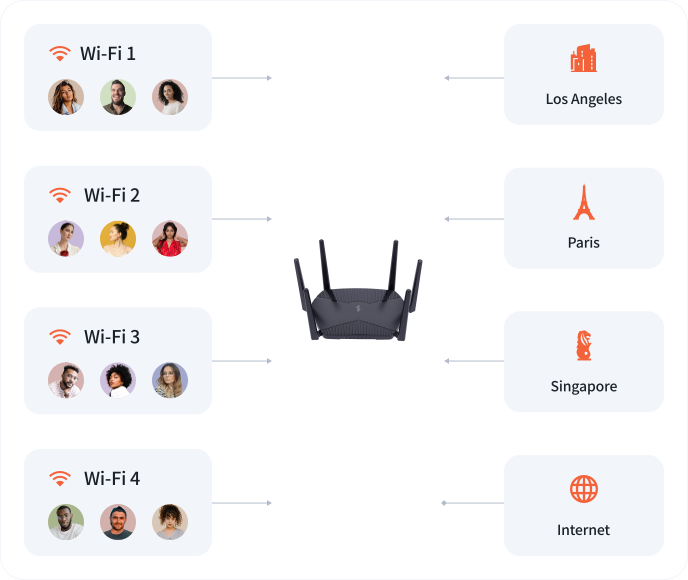
Run Surflare on a Router, for Teams
Connect a router running Surflare to your team Workspace and share it across all members. Everyone in the office can enjoy secure internet access through a single device.
Router License grants your Workspace access to use a connected Router. Physical router hardware sold separately from GL.iNet or authorized resellers.
Learn more about Surflare for Routers
Dedicated IP for Teams
A Dedicated IP is a static address exclusively assigned to your team. Share one Dedicated IP among all your team members.
- Datacenter IP or Residential IP available
- Stable access for e-commerce & live streaming
- Prevent IP address abuse
Same pricing as standard Surflare Dedicated IP plans.
Learn more about Dedicated IPBenefits of Surflare for Teams

One Workspace to manage all members, devices, and billing in a single place.

Per-seat pricing that adjusts automatically when you add or remove members.

Share Routers and Dedicated IPs across the entire team — perfect for e-commerce and streaming.

Military-grade encryption, Kill Switch, and multi-device protection for everyone.

Worldwide nodes for low-latency, region-flexible access wherever your team operates.
Built for Every Team
From e-commerce to engineering, Surflare for Teams fits the way you work.
How to Start

Set up your Workspace, add balance to your Wallet, then start your subscription.

Invite team members to your Workspace via email.

Team members connect and enjoy shared VPN protection.
Ready to roll out VPN and Dedicated IP across your team?
One Workspace. Shared resources. Scale anytime.