
Toronto IP, Proxy & VPN
From Bay Street trading floors to the TSX itself, Toronto is Canada's financial engine. Surflare's Toronto VPN, Datacenter, ISP and Residential IPs give every login and scraper a real Toronto address to match.
 Toronto VPN
Shared IP - Encrypt your connection and browse privately at full speed across 80+ countries
 Toronto Datacenter IP
Static · Dedicated - Fast, stable, and affordable. Hosted in datacenters and registered to hosting providers.
 Toronto ISP IP
Static · Dedicated - Residential trust with datacenter stability. One fixed IP, exclusively yours.
Not sure which IP type fits your use case? Compare Datacenter, ISP and Residential IPs
About Toronto
Toronto is the capital of Ontario and Canada's largest city, with a metropolitan population of around 6.4 million across the Greater Toronto Area (GTA).
Toronto is Canada's financial capital, home to the Toronto Stock Exchange (TSX) and the head offices of the country's largest banks, insurers and Bay Street financial firms.
Toronto Internet Providers
Rogers calls Toronto home, while Bell's fibre wires Bay Street and Telus competes as the national challenger.
- Bell — Bell runs dense fibre through Toronto's downtown financial core, serving Bay Street's banks and brokerages alongside residential towers across the GTA.
- Rogers — Headquartered in Toronto, Rogers is the city's dominant broadband and mobile provider, with the deepest cable network across the Greater Toronto Area.
- Telus — Telus competes as the smaller national challenger in Toronto, offering fibre and mobile plans without the local scale it holds out west.
- Videotron — Videotron has little presence in Toronto, since its network and subscriber base stay concentrated almost entirely in Quebec.

Why a Surflare Toronto IP
Most providers only offer one type of Toronto IP. Here's what sets Surflare apart.
- Every IP type for one Bay Street login — Move between Toronto VPN, Datacenter, ISP and Residential IPs from a single Surflare account, whether you're streaming CBC Gem or signing into a TSX-listed investor portal.
- App for CBC Gem, proxy for Bay Street research — Connect with one tap in the Surflare app to stream CBC Gem, or plug the same Toronto IP's SOCKS5/HTTP credentials into a tool tracking TSX-listed stocks or bank portals.
- A dedicated IP Bay Street logins can trust — Your Toronto dedicated ISP or Residential IP is exclusively yours, so bank and brokerage portals see a stable address instead of one shared with other Rogers or Bell customers.
- Pin down the GTA, not just Ontario — Our IP pool is deep enough to target Toronto and the wider Greater Toronto Area specifically, instead of settling for a generic Ontario or Canadian address.

Toronto services you can reach

What you can do with a Toronto IP
Ontario provincial services
Manage ServiceOntario logins, GO Transit accounts and other Ontario provincial government accounts from a Toronto IP.

TSX and Bay Street finance
Access TSX-listed investor portals and Bay Street bank and fintech accounts that expect a local address.
Toronto marketplace accounts
Keep Amazon.ca seller accounts and other Toronto-linked marketplace profiles on a stable local IP.
Toronto IP, ready on every device
Whichever Toronto IP you get, Datacenter, ISP or Residential, just click to connect in the Surflare app. No manual proxy setup, no complex configuration.
Surflare apps are available for iOS, Android, Mac, Windows and Linux, plus browser extensions and router support.
With the Surflare app, your traffic stays encrypted on every device.

Use Toronto Residential IP via VPN or Proxy
Connect to a Toronto VPN, Datacenter IP or Residential IP with one click in the app, or use Toronto proxy credentials directly in your own tools and scripts.
Surflare App
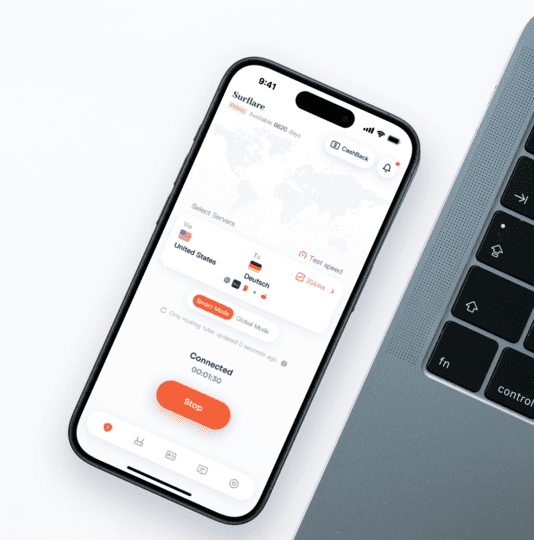
- One-tap connection to a Toronto VPN, Datacenter IP or Residential IP, no extra setup
- A consistent IP for streaming, banking and everyday browsing
- Switch locations any time, at no extra cost
SOCKS5 / HTTP Proxy
# SOCKS5 proxy
curl --proxy socks5://user:pass@proxy.surflare.com:1080 \
https://api.ipify.org
# HTTP proxy
curl --proxy http://user:pass@proxy.surflare.com:8080 \
https://api.ipify.org
# Python example
proxies = {"http": "socks5://user:pass@proxy.surflare.com:1080"}
- Toronto Datacenter and Residential IP Proxy
- SOCKS5 and HTTP(S) support
- Built for scrapers, automation and account management
More Canada cities
Frequently asked questions
Is using a VPN or proxy legal in Toronto?
Yes. Using a VPN or proxy in Toronto, like anywhere else in Canada, is legal for legitimate purposes such as privacy, streaming and account management. You remain responsible for the terms of the services you access.
Can I get a Surflare IP on the Rogers or Bell network in Toronto?
Yes. When ordering a dedicated Toronto ISP IP, you can select Rogers or Bell from the ISP list during checkout, subject to current inventory for the location.
Can a Toronto IP help me access CBC Gem or Crave?
Yes. A Toronto IP shows you the same local catalogue and pricing for CBC Gem, Crave and other Canadian streaming services that a real Toronto viewer would see.
Can I target Bay Street or a specific Toronto neighbourhood instead of all of Ontario?
Our IP pool is deep enough to target Toronto specifically, rather than settling for a broader Ontario or generic Canadian address, though block-level targeting depends on current inventory.
Get your Toronto IP in minutes
Dedicated residential and datacenter IPs, usable as a proxy or in the Surflare app.