John Wyatt
VPN Privacy Truths — Part 4
1. The Invisible Armor of the Internet
Every time you connect to the internet, your device sends out small pieces of information — your IP address, the websites you visit, the apps you use, even the time you connect. Without protection, this data travels across open digital highways, visible to anyone along the route — your ISP, advertisers, even cyber snoops on public Wi-Fi.
A VPN (Virtual Private Network) works like an invisible armor. It wraps your internet traffic in layers of encryption, hiding your digital movements from prying eyes. But how does this “armor” actually work?
Let’s break it down — simply, clearly, and in human language.
2. Step One: The Secure Tunnel
Imagine you’re sending a confidential letter through the post. Without protection, anyone who handles it can open and read it.
A VPN solves this by building a secure tunnel between your device and the VPN server. Once you turn it on, all your traffic — from web browsing to messaging apps — flows through this tunnel.
Inside that tunnel, everything is encrypted — scrambled into unreadable code. Outside observers (like your ISP or a hacker on public Wi-Fi) can see that you’re connected to a VPN, but not what’s inside your traffic.
If the internet is a noisy public street, your VPN tunnel is a private lane with blackout windows.
3. Step Two: Encryption — Turning Data into Code
Encryption is the heart of every VPN.
When you connect, your data is transformed into ciphertext — meaningless symbols without the right key to decode it. The VPN server holds that key, decrypts your data, and forwards it to its destination (like a website).
If someone intercepts your traffic mid-way — even a government-grade surveillance system — all they see is digital gibberish.
Most modern VPNs use AES-256 encryption, the same standard used by banks and military organizations. The “256” refers to key length — a number so large that even supercomputers would need billions of years to guess it.
In simple terms:
Without encryption, your online activity is a postcard.
With encryption, it’s a sealed safe — one only you and your VPN can open.
4. Step Three: Hiding Your IP Address
Every device connected to the internet has an IP address — a unique number that reveals your rough location and service provider. It’s like your digital home address.
When you visit a website directly, that site can see your IP. When you use a VPN, it only sees the VPN server’s IP, not yours.
So if you’re in Sydney and connect to a VPN server in London, websites think you’re browsing from the UK. This makes it much harder for advertisers, trackers, or government systems to trace activity back to you.
VPNs essentially act as a middleman for privacy — forwarding your requests without exposing your real identity.
5. Step Four: Protecting You on Public Wi-Fi
Public Wi-Fi is one of the easiest hunting grounds for hackers.
In airports, cafés, or hotels, cybercriminals often run fake Wi-Fi networks that look legitimate. Once you connect, they can intercept your traffic — a technique known as “man-in-the-middle” attacks.
A VPN stops this instantly. Because your traffic is encrypted from your device onward, even if someone captures it, they can’t read or manipulate the contents.
So the next time you log into a café’s Wi-Fi, your VPN becomes your personal bodyguard, ensuring no one else in that room can peek into your data.
6. Step Five: Shielding DNS and Preventing Leaks
Every time you type a website like “google.com,” your device asks a DNS (Domain Name System) server for the site’s IP address — like a phonebook lookup.
Normally, your ISP handles these DNS requests — which means it can see every website you visit, even when you use HTTPS.
A good VPN reroutes those DNS lookups through its own encrypted servers, preventing leaks that reveal your browsing patterns.
Premium VPNs like Surflare also include DNS, IPv6, and WebRTC leak protection, ensuring no stray data escapes the encrypted tunnel.
7. Step Six: Choosing the Right Protocol
Behind every VPN tunnel is a protocol — the rulebook defining how data travels and gets encrypted.
| Protocol | Speed | Security | Notes |
|---|---|---|---|
| WireGuard | ⚡ Fast | 🔒 Strong | Modern, efficient, open-source. Ideal for most users. |
| OpenVPN | ⚡ Moderate | 🔒🔒 Excellent | Industry standard, highly secure but slightly slower. |
| IKEv2/IPSec | ⚡ Very Fast | 🔒 Strong | Great for mobile devices, automatically reconnects. |
| L2TP/PPTP | 🐢 Outdated | ⚠️ Weak | Legacy protocols — avoid for sensitive data. |
The best VPNs automatically select the optimal protocol for your device and network.
Surflare, for instance, supports both WireGuard and OpenVPN, giving you a balance between speed and security — without needing to tweak settings manually.
8. Step Seven: RAM-Only Servers and No-Log Policies
Privacy isn’t just about encryption — it’s also about what happens to your data after it passes through the VPN.
Many low-quality VPNs log user activity (connection times, IP addresses, sites visited). That data can later be sold or requested by authorities.
In contrast, privacy-first providers like Surflare operate on RAM-only servers — meaning data exists only in temporary memory and is completely wiped when the server restarts.
Paired with a strict no-log policy, this ensures that even if someone demanded your browsing records, there’s nothing to give.
No traces, no archives, no digital footprints.
9. Step Eight: Multi-Hop and Obfuscation
For advanced privacy seekers, VPNs can go one step further:
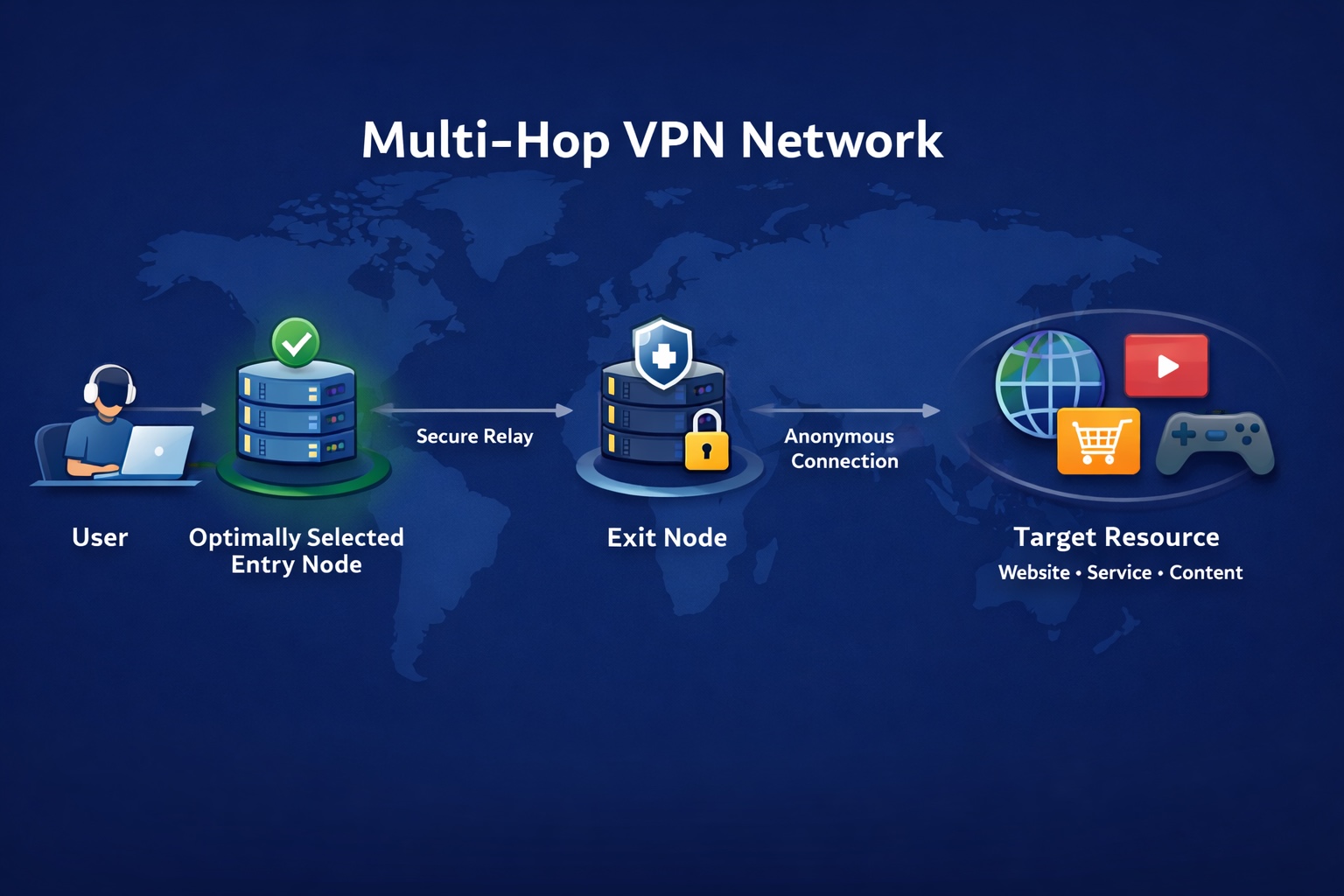
- Multi-Hop VPN routes your traffic through two or more VPN servers in different countries, adding extra layers of encryption.
- Obfuscation disguises VPN traffic as regular HTTPS data, helping users bypass censorship or VPN blocks in restrictive regions.
These features turn your tunnel into a maze of encrypted connections, making your online identity virtually untraceable.
10. The Real-World Payoff
In practice, here’s what all these layers of protection mean:
- Your ISP can’t see what you do online.
- Hackers can’t steal your data over Wi-Fi.
- Advertisers can’t profile your identity or track you across sites.
- Websites see your VPN server, not your real device.
- Your history stays private — everywhere.
VPNs aren’t about hiding from the world; they’re about taking control of your data in a world that collects too much of it.
11. Quick Summary
| Threat | Without VPN | With VPN |
|---|---|---|
| ISP tracking | ✅ Visible | ❌ Hidden |
| Wi-Fi snooping | ✅ Vulnerable | ❌ Protected |
| DNS leaks | ✅ Common | ❌ Encrypted |
| Location exposure | ✅ Exposed | ❌ Masked |
| Advertiser tracking | ✅ Easy | ⚠️ Limited |
| Log retention | ⚠️ Depends on provider | ❌ Zero-log (RAM-only) |
The bottom line: a VPN doesn’t make you invincible — but it makes your digital life safer, quieter, and more private.
12. Conclusion — The Technology That Serves You
Good privacy technology should feel invisible — not complicated.
You don’t need to understand every cipher or protocol. You just need to know your VPN is working quietly, encrypting your traffic, hiding your location, and keeping you safe — wherever you connect.
That’s what true digital freedom looks like.
Surflare — Built for Real Privacy
Surflare isn’t just another VPN — it’s built from the ground up for privacy you can trust.
• Advanced WireGuard & OpenVPN encryption
• RAM-only infrastructure
• Multi-hop routing for stronger anonymity
• Automatic leak protection
It’s fast, secure, and easy to use — so you can enjoy the web with confidence, not caution.
Try Surflare — Sign In / Start