John Wyatt
You’ve likely encountered VPNs – virtual private networks touted for boosting online safety. At its core, using a VPN involves safeguarding the information flowing to and from your device online. But with countless providers available, how can you verify their claims of data protection? How do you determine their trustworthiness? This post explores VPN safety from multiple perspectives and details the specific elements that define a secure VPN.
Are VPNs Safe?
Generally, yes. VPNs are typically safe, legal tools accessible to anyone seeking to shield their internet traffic – provided you select a reputable provider.
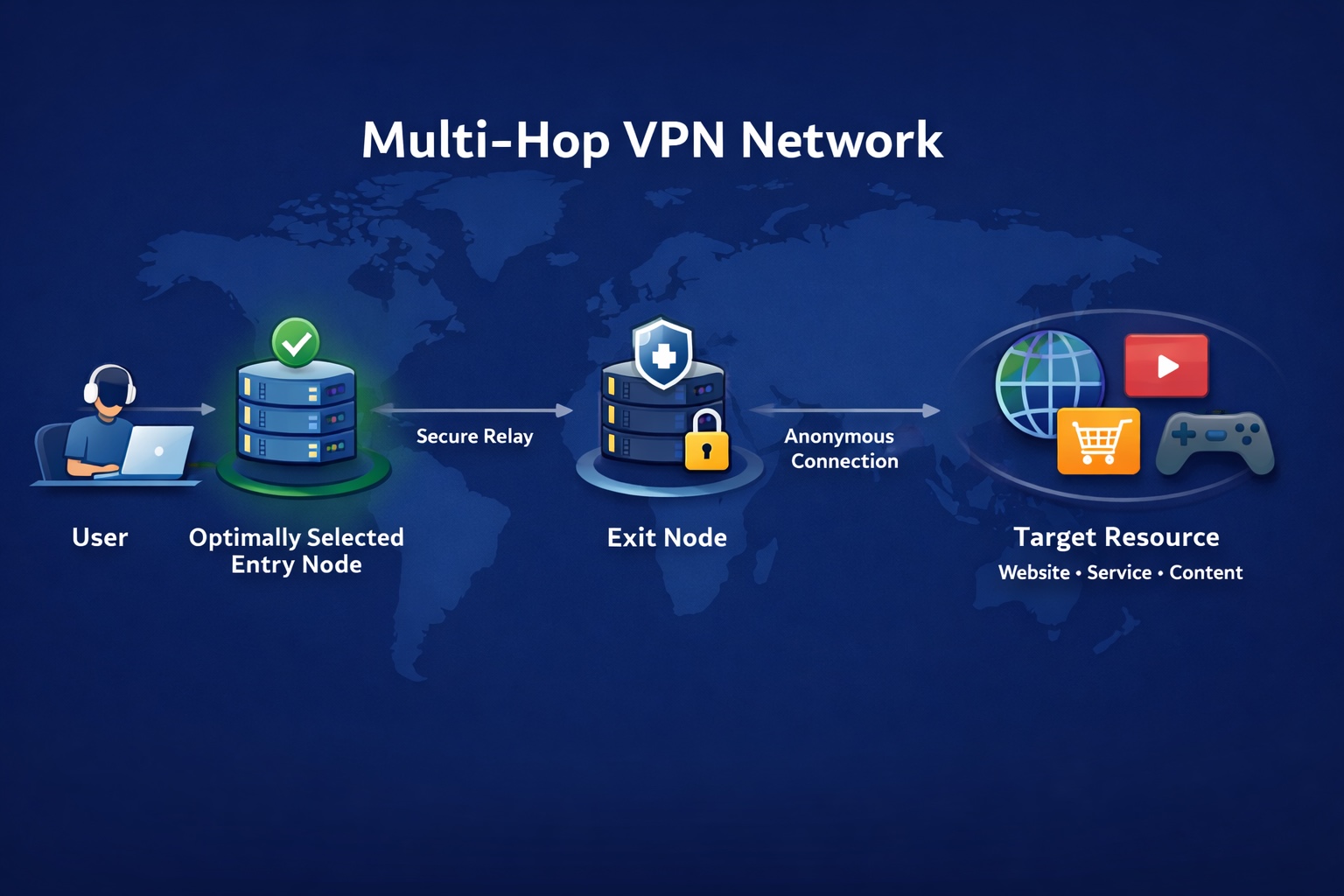
A VPN routes your data through its own server, encrypting it before it reaches the wider internet. This encryption keeps your information confidential and inaccessible to unauthorized parties. A high-quality VPN provider applies robust encryption, maintains fast speeds to avoid noticeable lag, and refrains from logging your online actions.
Do VPNs Really Work?
Absolutely. VPNs effectively enhance online privacy and security. For instance, on unsecured public Wi-Fi, a VPN blocks potential eavesdroppers from monitoring your activity.
Picture yourself working on a public network, like in an airport lounge. Without a VPN, others on that network could potentially spy on your online sessions – viewing emails or capturing login details. A VPN encrypts your connection, rendering your activity virtually unreadable to malicious actors, even on shared Wi-Fi.
VPNs are also invaluable for travelers. Abroad, you might find your usual streaming content unavailable due to regional restrictions. A VPN allows you to select a virtual location back home, letting you stream your favorite shows seamlessly.
Do VPNs Prevent Hackers from Accessing Your Information?
Not entirely. A VPN primarily shields your data during transit between your device and the internet.
On vulnerable networks (airports, cafes, hotels), hackers can intercept unencrypted traffic, stealing credentials or payment details. A VPN encrypts this connection, scrambling your data to deter snoopers.
VPNs also counter “man-in-the-middle” attacks, where hackers secretly intercept or alter communications between you and a website/app. VPN encryption makes this tampering extremely difficult.
Crucially, a VPN won’t protect you if you download malware, click harmful links, or succumb to phishing scams. Effective online security combines robust tools with vigilant habits.
Do VPNs Keep Your Online Activity Safe from Your ISP?
While not total invisibility, a VPN prevents your ISP from seeing your specific browsing history or data content.
Without a VPN, your ISP can observe every website you visit and often the apps you use. Connecting via a VPN creates an encrypted tunnel; your ISP only sees your connection to the VPN server, not your subsequent activity.
This means your ISP cannot log your browsing history, track streaming service usage, or deliberately slow down (“throttle”) your connection based on specific activities like high-bandwidth streaming or downloads. The VPN masks this traffic.
Do VPNs Protect Against DNS Leaks and IP Exposure?
Not automatically. Without proper configuration, DNS leaks or IP exposure can occur. However, reliable VPNs (like NordVPN) incorporate features to prevent these.
Normally, your ISP’s DNS servers translate website names, potentially revealing your visits. A DNS leak happens when these requests bypass the VPN tunnel. A trustworthy VPN routes all traffic, including DNS queries, through its secure servers, hiding your real IP and activity. If the VPN connection fails, a Kill Switch halts internet traffic to prevent accidental exposure.
Verify your protection using NordVPN’s DNS leak test tool.
Do VPNs Make You Anonymous?
No. A VPN enhances privacy but doesn’t grant true anonymity online. It masks your IP and encrypts traffic, yet you still leave traces when logging into accounts or sharing personal information. The notion of VPN anonymity is debated; it provides privacy, not invisibility.
What Makes a VPN Secure?
Choosing a secure VPN hinges on recognizing key trust-building features:
- Strong Encryption: Premium services use industry-standard AES-256 encryption, offering near-unbreakable protection for connections, even on public networks.
- Secure VPN Protocols: Security-focused VPNs employ robust protocols. WireGuard has emerged as the leading standard for its optimal speed-security balance. NordVPN developed NordLynx based on WireGuard.
- Advanced Key Management: Essential for security is Perfect Forward Secrecy (PFS). This system generates a unique encryption key for every session. Compromising one key doesn’t affect past or future sessions.
- Strict No-Logs Policy: A trustworthy provider doesn’t monitor or record details of your online activities.
- Account Protection: Multi-factor authentication (MFA) adds vital security. Reputable VPNs also prioritize server security and robust authentication to safeguard credentials.
- Secure Server Infrastructure: A dependable VPN relies on hardened servers:
- RAM-Only Servers: Data is stored solely in volatile memory, wiped clean on reboot, minimizing data retention risks.
- Colocated Servers: Providers owning and controlling their hardware (not renting) ensure tighter security oversight, reducing vulnerabilities from third-party access.
- Independent Security Audits: Regular audits by external firms verify adherence to privacy policies and security standards. Transparent providers share these reports publicly.
- Proactive Vulnerability Testing: Leading VPNs engage with security researchers through platforms like HackerOne (e.g., Nord Security), allowing experts to identify and report potential weaknesses.