Global Top AI Access Guide: 5 Secure Ways to Enjoy Claude/OpenAI/Gemini

With the rapid development of artificial intelligence technology, top AI assistants like Claude, ChatGPT, and Gemini have become essential tools for enhancing work efficiency and creativity. However, due to regional restrictions and differences in network environments, many users find it difficult to access these services directly. This article will provide you with a detailed introduction to five secure and stable access solutions, covering a range of options from zero cost to professional level, helping you find the most suitable solution based on your needs.

Summarize the content with AI:

February 8, 2026 at 09:17 PM Global Access
Cross-border Access secure browsing Surflare VPN VPN encryption VPN for Remote Work

Method 1: VPN Service (Recommended for Beginners)

What is a VPN?

A VPN (Virtual Private Network) routes your internet traffic through encrypted tunnels to servers in other countries, allowing access to restricted websites.

Core Advantages

  • Easy to Use: One-click connection, no technical background required
  • Full Device Support: Coverage across all platforms including Windows, macOS, iOS, and Android
  • Instant Activation: Available immediately after subscription
  • Privacy Protection: Encrypts all internet traffic

Usage Recommendations

When choosing a VPN service, prioritize the following factors:

  1. Server Coverage: Ensure there are nodes in regions supported by Claude/OpenAI, such as the USA and Japan
  2. Connection Stability: Prefer providers that offer dedicated lines or IPLC lines
  3. Speed Performance: AI conversations require stable network latency
  4. Privacy Policy: Choose providers with a no-logs policy

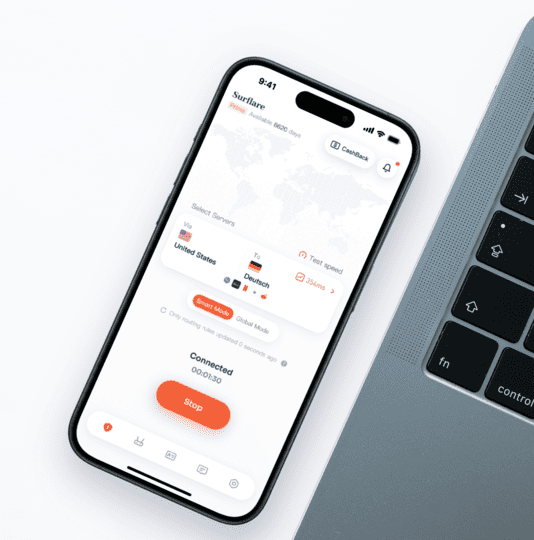
Recommended Solution: Surflare VPN

Surflare VPN is a VPN service optimized for AI users:

  • Smart Routing – Automatically selects the optimal node to ensure smooth access to AI services
  • Multi-Protocol Support – Based on an advanced proxy framework, stable and efficient
  • Cross-Platform Client – Supports mainstream operating systems and mobile devices
  • Stable and Reliable – Specifically optimized for services like Claude and ChatGPT

Method 2: Self-Built Proxy Server with VPS (Technical Users)

Applicable Scenarios

If you have a certain level of technical knowledge, building your own proxy server is a more flexible and economical choice.

Basic Steps

1. Choose a VPS Provider

ProviderOfficial WebsiteFeatures
Vultrvultr.comHourly billing, many data center options
DigitalOceandigitalocean.comSimple to use, rich documentation
Linodelinode.comHigh cost-performance ratio, established and stable
AWS Lightsailaws.amazon.com/lightsailAmazon product with good network quality

2. Deploy Proxy Software

It is recommended to use the Clash series of open-source proxy solutions.

3. Configure Clients

  • Windows/macOS: Clash Verge Rev
  • iOS: Shadowrocket, Quantumult X
  • Android: Clash Meta for Android

Note: Key Challenge: Network Quality

The biggest challenge of self-built VPS is network stability and speed. Many ordinary VPS international lines have poor quality, which may lead to:

  • Unstable connections, frequent disconnections
  • High latency, slow AI conversation responses
  • Severe packet loss during peak times

Suggestions for VPS Network Optimization:

Optimization DirectionSuggestions
Line TypePrefer CN2 GIA, IPLC/IEPL dedicated lines, CMI optimized lines
Data Center LocationLower latency in regions like Hong Kong, Japan, and Singapore
Provider SelectionChoose providers that optimize routes to China (e.g., Bandwagon Host CN2, DMIT, etc.)
Test FirstTest the ping values and route traceroute of the IP before purchasing

Cost Estimation

  • VPS cost: approximately $5-10/month (high-quality lines may require $15-30/month)
  • Initial configuration time: 1-2 hours
  • Maintenance cost: relatively low (can be automated with scripts)

Tip: Tip: If you don't want to deal with network optimization issues, directly using a professional VPN service (like Surflare) would be a more hassle-free choice.


Method 3: Cloud Service Provider Hosting AI (Enterprise-Level Solutions)

For large enterprises or scenarios with strict compliance requirements, accessing AI models through cloud service providers is the best choice.

Amazon Bedrock

Amazon Bedrock is a fully managed AI service platform launched by AWS, providing official access to the Claude model.

  • No infrastructure management required
  • Deep integration with the AWS ecosystem
  • Enterprise-level security and compliance guarantees
  • Supports the full range of Claude models

📖 Official Documentation: docs.aws.amazon.com/bedrock
💰 Pricing Reference: aws.amazon.com/bedrock/pricing

Google Cloud Vertex AI

Vertex AI also provides hosting services for the Claude model.

  • Native integration with Google Cloud
  • Supports FedRAMP High compliance requirements
  • Flexible pay-as-you-go pricing model
  • Global multi-region deployment

📖 Official Documentation: cloud.google.com/vertex-ai/docs

Applicable Scenarios

  • Large enterprise application development
  • Projects requiring data compliance guarantees (GDPR, SOC 2, FedRAMP, etc.)
  • Large-scale API call requirements
  • Integration with existing cloud infrastructure
  • Need for a professional technical support team

Method 4: API Proxy Service (Developer/Enterprise Solutions)

What is API Proxy?

API proxy services act as a proxy layer, forwarding your API requests to service providers like OpenAI and Claude, solving network access issues while providing a unified interface experience.

Solution Types

TypeDescriptionApplicable Scenarios
Third-Party Hosting ServiceUse an existing proxy platformQuick start, individual developers
Self-Built Proxy ServiceDeploy and maintain yourselfEnterprise-level, with customization needs

Solution A: Third-Party Hosting Service (Recommended for Quick Start)

OpenRouter (Recommended)

OpenRouter is currently the most popular unified AI API gateway.

  • 300+ Models Unified Access: One API Key accesses all mainstream models like Claude, GPT, Gemini, etc.
  • OpenAI Compatible Interface: No code changes needed, just change the base URL
  • Smart Routing and Fault Tolerance: Automatic failover to improve service availability
  • Transparent Pricing: Consistent with original factory prices, billed by usage

📖 Official Documentation: openrouter.ai/docs

Python Usage Example:

from openai import OpenAI

client = OpenAI(
    base_url="https://openrouter.ai/api/v1",
    api_key="your-openrouter-key"
)

response = client.chat.completions.create(
    model="anthropic/claude-sonnet-4",
    messages=[{"role": "user", "content": "Hello!"}]
)

Note: Note: Platforms like OpenRouter may still need to resolve network access issues.

Solution B: Self-Built API Proxy Service (Enterprise-Level Solution)

If you need complete control over data flow, have customization needs, or enterprise compliance requirements, you can choose to build your own proxy service.

Cloudflare AI Gateway

Cloudflare AI Gateway provides enterprise-level AI API proxy services.

  • Request caching to reduce costs
  • Rate limiting and access control
  • Detailed usage analytics
  • Unified management of multiple vendors

📖 Official Documentation: developers.cloudflare.com/ai-gateway

Note: Challenges of Self-Built Solutions

Building your own API proxy service requires consideration of the following factors:

Server PreparationNeed to purchase and configure overseas servers (similar to self-built VPS)
Network IssuesAlso faces challenges of line quality, latency, stability, etc.
Operational CostsRequires continuous maintenance of services, handling failures, updates, security, etc.
Technical BarriersRequires a certain level of backend development and operational capability
Compliance RisksMust assess data security and compliance requirements independently

Tip: Suggestion: For individual developers or small teams, using hosted services like OpenRouter is more hassle-free; for large enterprises that need to self-build, it is recommended to combine with official solutions from Amazon Bedrock or Vertex AI.

Domestic API Proxy Services

For domestic developers, some third-party platforms provide convenient API proxy services:

  • Supports payment in RMB
  • Direct connection to domestic networks
  • API fully compatible with official API

Note: Security Tip: When using third-party proxy services, please evaluate the provider's reputation to avoid the risk of API Key leakage. For sensitive business, it is recommended to use official channels.


Method 5: Self-Built Proxy with Cloudflare Workers (Free Solution)

Solution Overview

Using the free quota of Cloudflare Workers (100,000 requests per day), you can build your own dedicated API proxy service.

Implementation Steps

  1. Register a Cloudflare Account: Visit dash.cloudflare.com to register a free account
  2. Create a Worker: Create a new Worker in the Cloudflare Dashboard and deploy the proxy code
  3. Configure Domain Name (Optional): Bind a custom domain name to enhance access stability

Open Source Project References

Advantages and Disadvantages

AdvantagesDisadvantages
Completely free (basic usage)Requires a certain technical background
Highly controllableInitial configuration is relatively complex
No traffic limitsMay be affected by Cloudflare policies
Global CDN accelerationRequires self-maintenance

Summary of Solution Comparisons

SolutionDifficultyCostStabilityTarget Audience
VPN Service$5-15/month⭐⭐⭐⭐All users (students, office workers, freelancers, etc.)
Self-Built VPS⭐⭐⭐$5-30/month⭐⭐⭐Technical users, geeks
Cloud Service Hosting⭐⭐Pay-as-you-go⭐⭐⭐⭐⭐Large enterprises, compliance requirement scenarios
API Proxy (Hosted)⭐⭐Pay-as-you-go⭐⭐⭐⭐Developers, product integration
API Proxy (Self-Built)⭐⭐⭐⭐Server + Maintenance⭐⭐⭐Medium to large enterprises, customization needs
Cloudflare Workers⭐⭐⭐Free⭐⭐⭐Technical enthusiasts, learning and practice

Final Recommendations

For Most Users (Recommended First Choice)

Whether you are a student, office worker, freelancer, or remote worker, if you want to smoothly use AI services like Claude, ChatGPT, and Gemini, the VPN solution is the simplest and most hassle-free choice—no technical background required, just download and install to use.

Recommended: Surflare VPN – Optimized for AI users, supports multiple platforms, stable and reliable.

For Developers

If you need to integrate AI capabilities into your application via API, the combination of OpenRouter + VPN is both economical and flexible.

For Large Enterprise Users

For large enterprises with strict compliance requirements, data security needs, and large-scale deployment scenarios, it is strongly recommended to adopt the official hosting services of Amazon Bedrock or Google Cloud Vertex AI. These solutions provide:

  • Enterprise-level SLA service guarantees
  • Comprehensive data privacy and compliance certifications (GDPR, SOC 2, FedRAMP, etc.)
  • Seamless integration with existing cloud infrastructure
  • Professional technical support teams
  • Flexible billing and cost management

Reference Links

Official Documentation

Recommended Resources


This article is for technical exchange and learning purposes only. Please comply with local laws and regulations and the service terms of each platform.